









If you’ve spotted 172.17.1.10 in your router settings, a Docker container, or a network log, you’re not looking at something broken or malicious. It’s a private IPv4 address, and understanding what it does — and doesn’t do — makes network troubleshooting far less confusing.
What Is 172.17.1.10?
Understanding the 172.17.1.10 IP Address
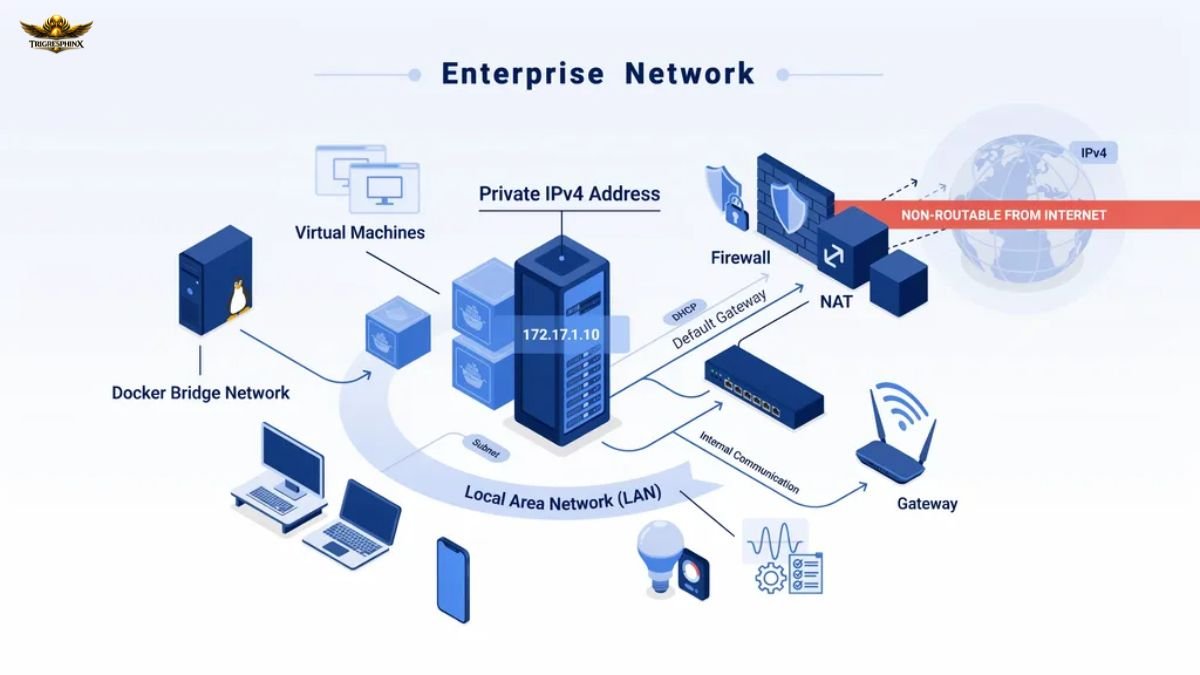
172.17.1.10 is a private IPv4 address in dotted-decimal format.. Like any IP address, it identifies a device on a network so that data packets know where to go. What makes this particular address notable is the range it falls in: the 172.16.0.0–172.31.255.255 block, reserved specifically for private, internal networking.
Is 172.17.1.10 Public or Private?
It’s private. Addresses in the 172.16.0.0/12 range are set aside by the Internet Assigned Numbers Authority (IANA) for use inside local networks only. That means 172.17.1.10 can appear on thousands of different home, office, or cloud networks simultaneously without any conflict, because it’s never routed across the public internet.
Is 172.17.1.10 a Bogon IP Address?
No. A “bogon” is an IP that shouldn’t appear in public internet routing tables at all — including unallocated ranges and private blocks used incorrectly. 172.17.1.10 is a legitimate private-use address; it only becomes a bogon-like anomaly if it’s mistakenly advertised on the public internet, which properly configured routers prevent.
How 172.17.1.10 Works
How Private IP Addressing Works
Private IP addressing lets organizations build internal networks without needing a unique public address for every device. Routers and gateways use Network Address Translation (NAT) to let many private-IP devices share one public IP when reaching the internet.
Why 172.17.1.10 Cannot Be Accessed From the Internet
Internet Service Provider routers and backbone routers are configured to drop traffic destined for private ranges like 172.16.0.0/12. So even if someone outside your network knew the address, they couldn’t reach a device at 172.17.1.10 directly — it simply isn’t routable beyond your local network boundary.
How Devices Communicate Using Private IP Addresses
Within a local network, devices communicate directly using private IPs via switches and routers. When a device needs to reach an external server, the router’s NAT function rewrites the source address, sends the request out publicly, and maps the response back to the correct internal device.
Common Uses of 172.17.1.10
Docker Bridge Networks
This is the most common place people encounter this address. Docker’s default bridge network (docker0) typically uses the 172.17.0.0/16 range, so containers are frequently assigned addresses like 172.17.1.10 automatically when they start.
Virtual Machines
Hypervisors such as VirtualBox, VMware, and Hyper-V often use the 172.x range for internal or NAT-based virtual network adapters, so a VM might show 172.17.1.10 as its address for host-guest communication.
Home and Office Networks
While 192.168.x.x is more common for home routers, some ISP-provided routers and mesh systems default to 172.16–172.31 ranges instead, making 172.17.1.10 a valid device or gateway address.
Enterprise Network Environments
Large organizations prefer the 172.16.0.0/12 block because it supports more subnets and devices than 192.168.0.0/16.
Testing and Development Environments
Developers frequently use 172.17.1.10-style addresses in local test labs, staging containers, or CI/CD pipelines where isolated, repeatable network configurations are needed.
Is 172.17.1.10 Safe?
Common Security Risks
The IP address is safe, but network misconfigurations can create security risks.. Weak router passwords, open ports forwarded to internal hosts, and outdated firmware are the real vulnerabilities, regardless of which private IP a device holds.
Can Hackers Access 172.17.1.10?
Not directly from the internet, since private ranges aren’t publicly routable. However, an attacker who already has access to your local network — through malware, a compromised device, or a rogue Wi-Fi connection — could interact with any private-IP device, including one at 172.17.1.10.
Best Practices for Securing Private Networks
Keep router firmware updated, disable unnecessary port forwarding, use strong Wi-Fi encryption (WPA3 where possible), segment IoT devices onto a separate VLAN, and monitor for unfamiliar devices on your network map.
How to Access 172.17.1.10
Checking Device Connectivity
Before trying to log in, confirm the device is reachable by pinging it from a machine on the same network.
Accessing a Router or Server
If 172.17.1.10 is a router or server’s management address, it usually has a web-based admin panel reachable over HTTP or HTTPS.
Using a Web Browser
Simply type http://172.17.1.10 or https://172.17.1.10 into your browser’s address bar while connected to the same network segment.
Using SSH or Remote Desktop
For servers or Linux-based systems, connect using ssh user@172.17.1.10. For Windows machines, Remote Desktop Protocol (RDP) can be used with the same address.
Why You Might See 172.17.1.10
Docker Assignments
Docker’s internal DHCP-like allocation assigns sequential addresses to containers as they launch, so 172.17.1.10 often just means it was the 10th or so container/interface created on that bridge.
Linux Network Configuration
Tools like ip addr or ifconfig may reveal 172.17.1.10 assigned to a virtual bridge interface (docker0, br-xxxx) rather than a physical NIC.
Virtualization Software
Virtual network adapters created by hypervisors can also self-assign from this range for host-only or NAT networking modes.
Corporate Network Infrastructure
IT departments managing large address pools often choose the 172.16.0.0/12 range specifically because of its scalability across many subnets and buildings.
Common Problems and Troubleshooting
| Problem | Likely Cause | Quick Fix |
| 172.17.1.10 Not Responding | Device offline or wrong subnet | Verify power/connection, confirm subnet mask |
| Connection Timed Out | Firewall or routing issue | Check firewall rules, confirm same network segment |
| IP Address Conflict | Two devices assigned same static IP | Set one device to DHCP or change its static IP |
| Firewall Blocking Access | Local firewall or security software | Temporarily disable to test, then allow the specific port |
| Incorrect Network Configuration | Wrong gateway or subnet settings | Re-check DHCP settings or manually correct the IP configuration |
172.17.1.10 vs Other Private IP Addresses
| Address | Range | Typical Use |
| 172.17.1.10 | 172.16.0.0–172.31.255.255 | Docker, enterprise networks, some ISPs |
| 192.168.1.1 | 192.168.0.0–192.168.255.255 | Most home routers |
| 10.0.0.1 | 10.0.0.0–10.255.255.255 | Large enterprise/ISP networks |
| 172.16.0.1 | Same block as 172.17.1.10 | Often a default gateway address |
Private vs Public IP Addresses
Private IPs (like all three ranges above) work only within local networks and repeat across the world without conflict. Public IPs are globally unique and directly reachable over the internet.
How to Find Your IP Address
- On Windows: Open Command Prompt and run ipconfig.
- On macOS: Go to System Settings → Network, or run ifconfig in Terminal.
- On Linux: Run ip addr or hostname -I.
- On Android and iPhone: Check Wi-Fi settings under the connected network’s details.
Related Networking Concepts
Subnet Masks define how many devices can exist on a network segment. CIDR Notation (like /16 or /24) is a shorthand way of expressing subnet size. The Default Gateway is the router address a device uses to reach outside networks. DHCP automatically assigns IPs like 172.17.1.10 without manual setup. NAT allows private-IP devices to share one public IP online. And while IPv4 addresses like this one remain dominant internally, IPv6 is gradually becoming the internet-facing standard.
FAQs
Can I Ping 172.17.1.10?
Yes, if you’re on the same local network or connected via VPN to that network.
Can I Change 172.17.1.10?
Yes through your router’s DHCP settings or by manually assigning a static IP on the device.
Who Owns 172.17.1.10?
No one “owns” it globally; it’s a private-use address reserved by IANA that any network can assign internally.
Why Does Docker Use 172.17.1.10?
Docker’s default bridge network automatically allocates addresses from the 172.17.0.0/16 pool to running containers.
Is 172.17.1.10 Reserved by IANA?
The broader 172.16.0.0/12 block is reserved for private networking, but 172.17.1.10 itself isn’t individually reserved for any single purpose.
Key Takeaways
172.17.1.10 is a private, non-routable IPv4 address commonly seen in Docker networks, virtual machines, and some enterprise or ISP setups. It can’t be reached from the public internet, poses no inherent security risk, and is easy to troubleshoot once you understand subnetting, gateways, and NAT basics.